|
Advanced Local Settings Tab
The Advanced Local Settings tab contains queue, saving and processing options for Scan2x Windows. These settings apply to the computer on which they are configured only. The default values suit most installations. Change them only when needed.
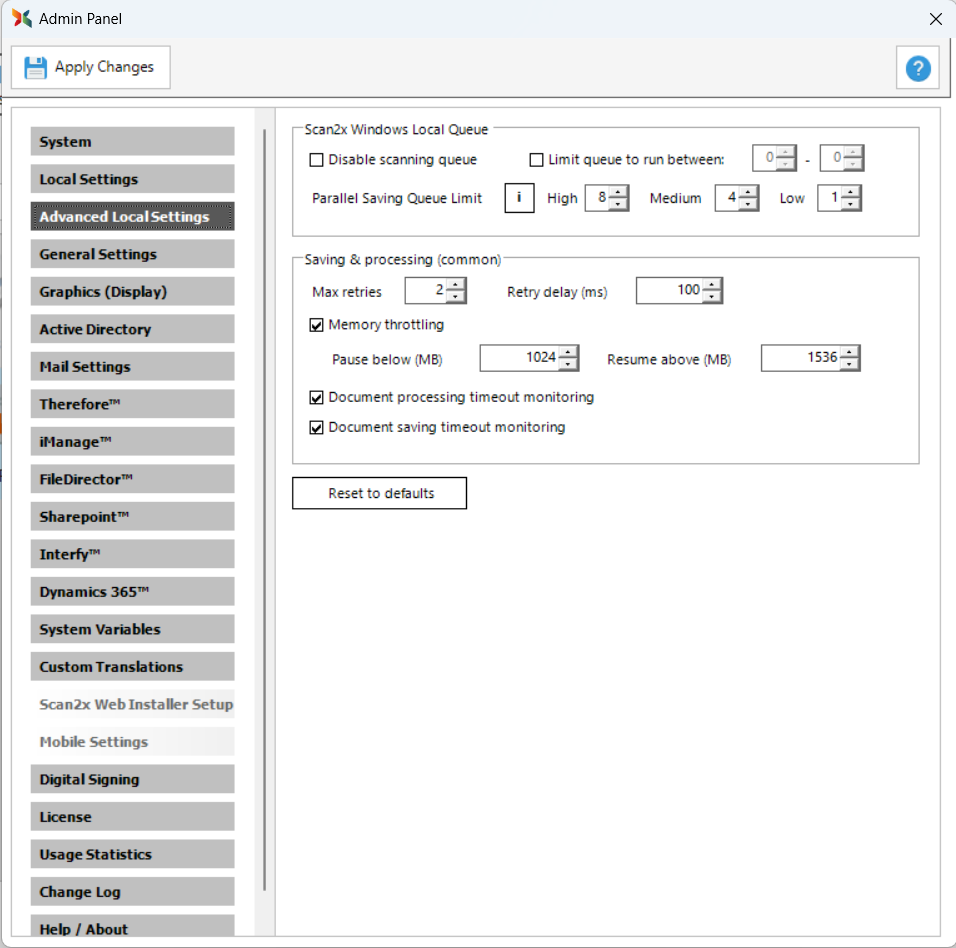
Scan2x Windows Local Queue
Use these settings to control when the scanning queue runs and how many documents it saves at the same time.
•Disable scanning queue: Disables the scanning queue.
•Limit queue to run between: Restricts the queue to run only between the hours you set.
•Parallel Saving Queue Limit: Sets the number of documents that can be saved at the same time. The limit depends on what Scan2x is doing:
•High: while Scan2x is idle.
•Medium: while a document is being previewed.
•Low: while a document is being processed.
Click (i) next to Parallel Saving Queue Limit for more information.
Document Saving
•Message timeout: The time Scan2x waits for a save to complete before a timeout message is raised.
•Document saving timeout monitoring: Enables monitoring for saving timeouts.
Document Processing
•Document processing timeout monitoring: Enables monitoring for processing timeouts.
•Stage timeouts: Expand this section to set the timeout for each processing stage.
Saving and Processing (Common)
These settings apply to both saving and processing. Retries:
•Max retries: The number of times a failed step is retried.
•Retry delay (ms): The time Scan2x waits, in milliseconds, before retrying a failed step.
Memory Throttling
When Memory throttling is enabled, Scan2x pauses new work if the available memory falls below the Pause below (MB) value. Work resumes automatically when the available memory rises above the Resume above (MB) value. While saving is paused, a red message is displayed next to Pause Queue.
When Changes Take Effect
After you click Apply Changes, the settings take effect as follows:
•Immediately: parallel saving limits, saving memory throttling and alert emails.
•From the next batch: document processing settings.
•After Scan2x is restarted: saving retries and the saving message timeout.
Scan2x Web
If the Scan2x Web background processing service is installed on the computer, Scan2x offers to apply the retry, timeout, memory throttling and alert email settings to it as well.
Important: Applying these settings restarts the service. Any Scan2x Web processing in progress is interrupted.
If you click No, Scan2x Web keeps its existing settings. These settings are not synchronised with Scan2x Windows.
Resetting to Defaults
Click Reset to defaults to restore the default values for this tab.
|

