|
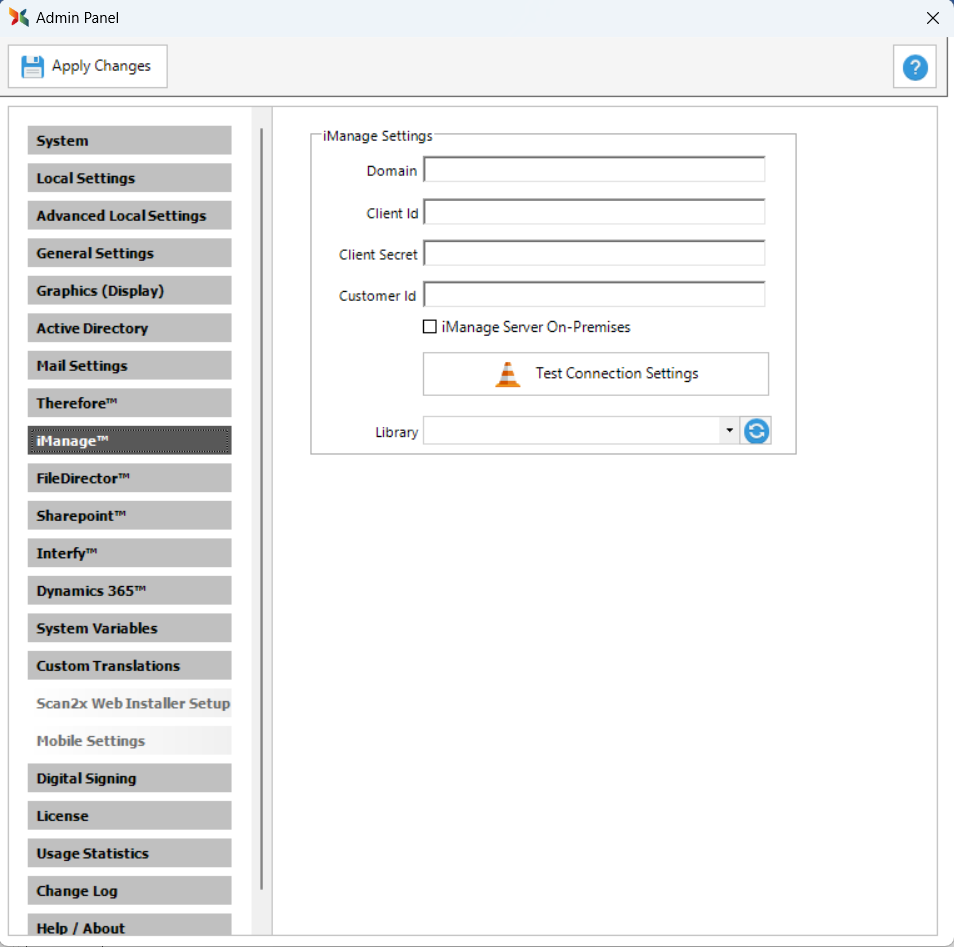
iManage™ tab
Use the iManage™ tab to connect Scan2x to iManage™ for jobs that save their output to iManage™.
iManage Settings
|
Field
|
Description
|
|
Domain
|
The domain of the iManage™ site.
|
|
Client ID
|
The Client Id used to connect to iManage™.
|
|
Client Secret
|
The Client Secret used to connect to iManage™.
|
|
Customer ID
|
The Customer Id used to connect to iManage™.
|
|
iManage Server On-Premises
|
Select this checkbox to connect to an iManage™ on premises server.
|
|
Test Connection Settings
|
Tests whether Scan2x can connect to the iManage™ site with the details entered. See Testing the Connection below.
|
|
Library
|
Sets the default Library for scan jobs that save to iManage™. A job specific Library can also be selected for an individual job, from the iManage™ option on the Output Settings tab.
|
Testing the Connection
Click Test Connection Settings. If Scan2x can connect to the iManage™ site with the details entered, a Login window opens.

Enter the username and password of the Scan2x administrator on the iManage™ site, and click Connect. A green tick appears next to Test Connection Settings. This shows that the connection was successful.

|

